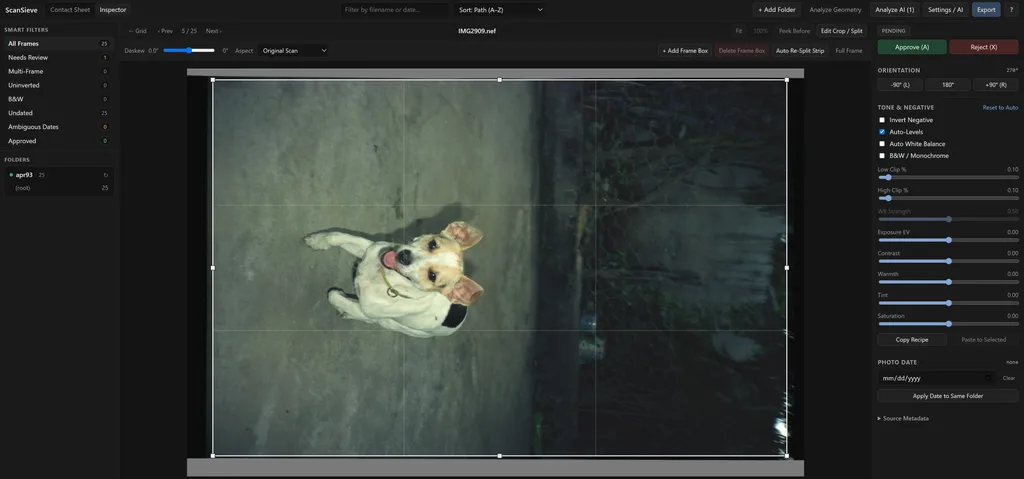
ScanSieve is a free, local-first film scan processor I built after scanning thousands of 35mm negatives on a Nikon Super Coolscan 4000 ED and an Epson V600 and ending up with a massive backlog of unedited .NEF and .TIFF files sitting on disk. Going through thousands of frames one by one to crop film borders, fix sideways orientations, adjust flat contrast, and transcribe imprinted camera date stamps is tedious work.
Most existing film-scanning software focuses heavily on raw negative inversion inside a paid subscription or a Lightroom plugin. What I could not find was a free, open-source, format-agnostic local tool that handles large, messy archives of already-scanned Nikon .NEF and flatbed .TIFF files end to end, preserving full 16-bit depth, embedded ICC profiles, and existing roll folder organization while using local AI only where deterministic scripts fall short.
Why this local film scan processor exists
Raw film scan archives tend to be messy in ways general-purpose photo editors do not handle cleanly in bulk:
- Scanner format quirks: Nikon Scan
.NEFfiles are not standard DSLR Bayer RAWs. They store a small 8-bit preview thumbnail on Page 0 along with the embedded ICC profile (such asNikon Adobe RGB) and scanner metadata, while storing the actual 4000-DPI 16-bit RGB image inside a SubIFD. Naive scripts either load the thumbnail or silently drop the ICC profile and wash out colors. - Mixed single-frame and multi-frame scans: Dedicated film scanners output one frame per file, while flatbed scanners like the Epson V600 often produce multi-frame strips that need to be split into separate virtual frames.
- Borders, edge slivers, tilt, and orientation: Black film rebates, narrow scanner-lip bevel edges, and white borders throw off histogram adjustments, while mixed portrait, landscape, and upside-down frames have to be rotated before export.
- Imprinted quartz dates: Many 1990s and 2000s negatives carry glowing orange 7-segment date stamps directly on the image, which classic OCR struggles to read reliably, especially when
YY MM DDvsMM DD YYformats are ambiguous.
In practice, the workflow I wanted was straightforward:
- Point the tool at read-only folders of
.NEFand.TIFFscans without touching the originals. - Run deterministic 16-bit border detection, scanner-lip edge trimming, deskewing, and multi-frame splitting.
- Optionally run a local vision model to fix upright rotation and read imprinted quartz date stamps.
- Review only the flagged edge cases visually with an accurate before/after comparison.
- Export lossless 16-bit archival TIFF masters and color-managed sRGB viewing copies while preserving my existing roll/event folder structure, with capture dates embedded cleanly in EXIF/XMP metadata (or optional date-based subfolders when needed).
What ScanSieve does
ScanSieve is a local-first desktop and web application backed by a single portable data/ directory and SQLite catalog. It follows the same local-first philosophy as ShotSieve, adapted to a 1 source file -> N virtual frames model built specifically for film scan archives.
Right now, the workflow supports:
- Format-agnostic 16-bit ingestion: Reads Nikon Scan
.NEFand Epson/VueScan/SilverFast.TIFFfiles, selects the largest-area image plane across pages and SubIFDs, detects 4-channel RGBI infrared scans, and inherits root-IFD ICC profiles and scanner metadata automatically. - Non-destructive source handling: Designed to treat original scan folders as read-only rather than modifying, renaming, moving, or deleting source files. Incremental rescans skip unchanged files, and unmounted external drives are marked offline instead of purging catalog edits.
- Deterministic geometry, edge-sliver trimming & multi-frame splitting: Detects black film rebates and white scanner borders, trims narrow scanner-lip edge slivers while flagging dark night frames with low-confidence crops for review, estimates fine deskew angles (up to ±5°), supports configurable Aspect Ratio Lock (
Keep Ratio,Freeform,3:2,6:7,1:1, and more), and splits multi-frame flatbed strips into independent virtual frames. - Smart film-state detection: Uses CIELAB chroma analysis to identify B&W and silver scans (keeping auto white balance from introducing color casts) and flags stray uninverted color or B&W negatives.
- Shared 16-bit (
float32) tone & inversion engine: Provides non-destructive luminance-linked auto-levels, optional auto white balance, exposure, contrast, warmth, tint, saturation, and linear negative inversion. The browser’s live Before/After split slider calls the same math pipeline as the 16-bit exporter. - Optional local VLM analysis (
llama.cpp): Includes a guided first-run AI setup dialog with hardware auto-detection (plus top-toolbar access and an easy skip for--no-aior external endpoints). Downloads a pinnedllama-serverbinary and your choice of open-weight Qwen2.5-VL or Qwen3-VL model on demand with SHA256 and byte-size verification to detect upright rotation (0°/90°/180°/270°), read corner quartz date stamps with a two-pass corner zoom, and resolve ambiguous date formats at the roll/folder level. - Responsive 1080p-to-4K Review UI: Scales layout, typography, split-view handles, and crop controls smoothly across 1080p, 1440p, ultrawide, and 4K displays without shrinking controls on high-DPI monitors.
- Parallel, staged, folder-preserving export: Defaults to Approved only scope and Preserve input folder structure (keeping physical rolls and event subfolders intact 1:1), with presets to add Year/Month subfolders inside each source folder, organize globally by
YYYY/YYYY-MM/, or use custom templates. Stages both 16-bit lossless archival TIFF masters (defaulting to universally readableadobe_deflatecompression, withlzw,zstd, and uncompressed options) and sRGB viewing copies (JPEG,AVIF, orWebP) to temporary files before moving them into place to help avoid orphaned outputs if an export is interrupted. - Clean EXIF & XMP date separation: Keeps camera capture dates (
EXIF:DateTimeOriginalandXMP-photoshop:DateCreated, including partialYYYY-MMdates) separated from scanner digitization timestamps (EXIF:CreateDateandXMP-xmp:CreateDate), while preserving original ICC profiles and scanner provenance. - Portable bundles & CLI: Ships as lightweight portable archives for Windows x64, Linux x64, and Apple Silicon macOS (without bundling AI weights), plus full CLI commands (
scansieve inspect,scan,analyze-geometry,analyze-ai,serve,export) for headless or scripted batch runs.
The goal is intentionally narrow: automate the 85-90% of repetitive archival prep work cleanly in 16-bit while keeping final crop, tone, and date decisions in your hands.
How the film scan batch workflow works
A typical pass over a folder of scans looks like this:
- Launch ScanSieve (using the portable bundle,
run.bat/run.sh, orscansieve serve --open). On first launch, an optional setup dialog detects your hardware so you can either download a local vision model profile right away or skip straight into--no-ai/ external endpoint mode. - Add scan folders & analyze geometry: Add one or more root folders in the sidebar and trigger Analyze Geometry from the top toolbar. ScanSieve catalogs your files, generates color-managed sRGB previews and 16-bit working proxies, trims borders and scanner-lip slivers, estimates deskew angles, splits multi-frame flatbed strips, and flags B&W or uninverted frames.
- Run optional local AI analysis: Click Analyze AI in the top toolbar (or configure your runtime/model under Settings -> AI Runtime, or point ScanSieve at an existing OpenAI-compatible vision server like
llama-server, Ollama, or LM Studio) to detect upright orientations and read imprinted quartz date stamps. - Triage in the Review UI: Filter the contact sheet to Needs Review to inspect only the tricky frames: dark night shots, ambiguous date stamps, or multi-frame cuts. Use the interactive Before/After split slider to verify tonal adjustments, refine crop boxes with Aspect Ratio Lock or manual split handles where needed, and propagate a confirmed date across an entire folder or roll in one click.
- Export in parallel: Open the Export drawer (defaulting to Approved only scope and Preserve input folder structure), choose whether to output 16-bit archival TIFF masters (toned or geometry-only), sRGB viewing copies, or both, and pick your preferred folder organization preset (preserve 1:1, add Year/Month subfolders inside each folder, global
YYYY/YYYY-MM/, or custom templates). Exports are staged and resumable with per-file retry if interrupted.
Because ScanSieve writes standard EXIF/XMP capture dates, preserves original ICC profiles, and keeps scanner digitization metadata distinct from photo dates, exported files import cleanly into Immich, Lightroom Classic, Capture One, or DigiKam without misfiling 1990s film rolls under the year you scanned them.
Local AI models and runtime options
No AI models are bundled inside the repository or portable downloads. Instead of shipping multi-gigabyte PyTorch environments, ScanSieve manages a pinned llama.cpp (llama-server) binary inside data/runtime/, downloads your chosen GGUF weights and multimodal projector (mmproj) on demand with SHA256 and byte-size verification, and shuts the server down automatically after an idle timeout to release GPU VRAM.
Because the pinned llama.cpp runtime includes native Qwen3-VL support, ScanSieve offers five selectable profiles ranging from lightweight laptop models to high-precision 8-bit and Mixture-of-Experts options with full F16 vision projectors:
| Profile ID | Model & Quantization | Approximate Download | Estimated VRAM | Best For |
|---|---|---|---|---|
lite | Qwen2.5-VL-3B-Instruct (Q4_K_M) + Q8_0 mmproj | ~2.6 GiB | ~3.5 GB | 4-6 GB VRAM GPUs and CPU-only laptops. |
default | Qwen2.5-VL-7B-Instruct (Q4_K_M) + Q8_0 mmproj | ~5.2 GiB | ~6.5 GB | Balanced default for 8 GB GPUs. |
qwen3_8b | Qwen3-VL-8B-Instruct (Q4_K_M) + F16 mmproj | ~5.8 GiB | ~7.5 GB | Newer Qwen3-VL generation (Apache-2.0) on 8+ GB GPUs or Apple Silicon. |
quality | Qwen3-VL-8B-Instruct (Q8_0) + F16 mmproj | ~9.2 GiB | ~11.0 GB | High-precision 8-bit weights + full F16 vision for 12+ GB GPUs. |
ultra | Qwen3-VL-30B-A3B-Instruct (Q4_K_M MoE) + F16 mmproj | ~18.3 GiB | ~21.0 GB | 24+ GB GPUs or 32+ GB unified-memory Macs (30B total / 3B active parameters). |
| External Endpoint | Any OpenAI-compatible VLM API | None | Host-managed | Reusing an existing llama-server, Ollama, or LM Studio instance. |
No-AI Mode (--no-ai) | None | None | None | Running full 16-bit ingestion, auto-crop, flatbed splitting, tonal editing, before/after review, and export with zero AI downloads. |
Supported managed acceleration backends include Windows x64 (CUDA, Vulkan, CPU), Linux x64 (CUDA, Vulkan, CPU), and macOS Apple Silicon (Metal).
Limitations
ScanSieve is built around practical archival constraints, so it is worth calling out what it does not try to do today:
- Alpha software: ScanSieve is early alpha software provided as-is without warranty of any kind. Features, catalog schemas, and defaults may change between releases. Use at your own risk, test on copies of your files first, and always keep independent backups of your original scans.
- No AI dust or scratch removal: If your negatives were scanned with hardware Digital ICE (as on a Nikon Coolscan), dust is already baked out. For B&W silver scans or flatbed scans with heavy dust, ScanSieve intentionally leaves AI inpainting out of v1 so natural film grain stays untouched; pair it with a dedicated dust tool if needed.
- Human review is still required: Automated border detection is deliberately conservative on dark night shots, and quartz date-backs occasionally had wrong camera dates or dead batteries. Treat auto-crops and VLM dates as fast first-pass proposals rather than infallible truth.
- Runtime and model weights are separate downloads: Portable packages stay lightweight because they do not bundle
llama-serveror multi-gigabyte GGUF weights. An initial internet connection is needed only if you choose to download a runtime and model profile inside Setup or Settings. - Hardware and platform caveats: Prebuilt managed
llama.cppruntimes cover Windows x64, Linux x64, and macOS Apple Silicon (arm64). Intel Macs and Linux ARM64 machines should run from source using--no-aior an external--endpoint. GPU acceleration depends on your OS, driver version, and backend (Vulkanis included as a lightweight alternative if a specific CUDA toolkit mismatches your GPU). - Third-party model licenses: While ScanSieve itself is licensed under
AGPL-3.0-or-later, downloadedllama.cppbinaries and open-weight VLM checkpoints carry their own licenses (the Qwen3-VL profiles areApache-2.0, while Qwen2.5-VL carries its own upstream license). ReviewTHIRD_PARTY_LICENSES.mdbefore commercial use.
How to try ScanSieve
ScanSieve is open-source and available on GitHub:
- GitHub Repository: https://github.com/cfelicio/ScanSieve
- Portable Releases: https://github.com/cfelicio/ScanSieve/releases
Download the portable bundle for your operating system from the Releases page (ScanSieve-portable-windows-x64.zip, or the .tar.gz bundle for Linux x64 and macOS arm64), extract it, and run the launcher.
If you prefer running from source with Python 3.13+, you can use uv (or the included run.bat / run.sh launchers):
git clone https://github.com/cfelicio/ScanSieve.git
cd ScanSieve
uv sync
uv run scansieve serve --open
If you do not use uv, a standard virtual environment works as well:
python -m venv .venv
# Activate .venv, then:
pip install -e .
scansieve serve --open
To verify how ScanSieve reads one of your own files before scanning a full folder, run:
scansieve inspect path/to/scan.nefThat prints the selected SubIFD or page, 16-bit dimensions, channel/IR layout, inherited ICC profile name, and normalized scanner metadata without modifying anything on disk.
FAQ
Is ScanSieve free?
Yes. ScanSieve is free and open-source software licensed under the GNU Affero General Public License v3.0 or later (AGPL-3.0-or-later). Optional local AI runtimes and model weights downloaded separately carry their own third-party licenses.
Is ScanSieve cloud-based?
No. ScanSieve is local-first and binds its web review UI to 127.0.0.1. Your scans, previews, SQLite catalog, and exported files stay on your own machine. An internet connection is only needed if you choose to download the optional llama.cpp runtime and VLM weights during setup.
Does ScanSieve modify my original Nikon NEF or Epson TIFF files?
ScanSieve is designed to treat source folders as read-only and does not modify, rename, move, or delete original files. Every crop, deskew, rotation, tonal recipe, and date edit is stored non-destructively in data/catalog.db and applied only when writing new files to your chosen export directory. Because this is early alpha software, test on copies first and keep independent backups of your originals.
Why does ScanSieve preserve my original folder structure by default instead of moving files into date folders?
In real film archives, physical rolls and event folders (such as Japan_1998/Roll_01/ or Family_Box_2/) often mix dated and undated frames. Preserving your input folder structure by default keeps each roll together while embedding confirmed capture dates into EXIF:DateTimeOriginal and XMP-photoshop:DateCreated so Lightroom, Immich, DigiKam, and Apple Photos sort everything chronologically automatically. If you want date-based folders on disk, you can switch the Output Folder Organization preset in the Export drawer anytime.
Does ScanSieve replace Negative Lab Pro or Lightroom?
No. ScanSieve is an archival batch-preparation and review tool designed to turn large folders of raw or already-inverted .NEF and .TIFF film scans into cropped, upright, dated, ICC-managed 16-bit masters and viewing copies. While it includes linear negative inversion and tonal controls, dedicated color-grading tools like Lightroom, Capture One, or Negative Lab Pro remain better suited for fine creative grading on standout hero frames.
Why does ScanSieve default to Deflate instead of ZSTD for 16-bit TIFF exports?
While zstd compresses 16-bit TIFFs slightly smaller, Windows Photos and File Explorer (WIC), standard Pillow, and OpenCV do not natively decode ZSTD-compressed TIFFs and can display them as solid black frames. adobe_deflate is lossless, reduces raw scan file sizes meaningfully, and opens cleanly across Windows, macOS, Linux, and major photo editors. zstd remains selectable if your downstream tools support it.
Which ScanSieve package should I download?
Download the portable bundle matching your operating system from GitHub Releases (Windows x64, Linux x64, or Apple Silicon macOS), or run directly from source using Python 3.13+. Once launched, you can use all deterministic cropping, tonal, and export features right away, or use the first-run setup dialog (or Settings -> AI Runtime) to download the recommended local backend and vision model profile (lite, default, qwen3_8b, quality, or ultra) for your hardware.